• Skip to primary navigation
  • Skip to main content
  • Skip to primary sidebar
  • Skip to footer

Rune Ellingsen

Internet Marketing - With Rune Ellingsen

  • Book a free 15 minute call 👉

list building

Aweber Review – Buyers Review

January 24, 2018 by Rune Ellingsen

Aweber Review 2018 – Aweber Buyers Review

This Aweber review will let you in on how Aweber is working as an email service provider.

Aweber is one of many autoresponder services out there.

It is highly functional and is easy to use.

That is why they have many satisfied consumers.


Try AWeber free for 30 days! – AWeber Communications

This Aweber review will show you the insides of the platform and its ease of use.

If you are new to autoresponders, this is one of the very few which is easy to grasp fairly quickly.

You have competitors out there like GetResponse, MailChimp, and others. Alas, this is one of the few which we found to be of top-notch service as it has, in our opinion, one of the easiest learning curves among the autoresponders in this price range.

You can also get your account at a low price as compared to many others out there.

This makes it highly attractive for small businesses and rightfully so.


This being said, there has been a lot of new companies that have come into the autoresponder business with their own software as the industry is so big and profitable.

In this Aweber review, we will talk mostly about Aweber, of course, and more precisely, what it can do for you.


If you want to visit their site, you can do so by clicking here: Go To Aweber


On their site, they have several accounts available with different payment sizes according to your needs.

For example, you can start off with a free account, which goes for 30 days.

When and IF you choose to try them out, this is a small snippet what’s included:

  • Access to our live team of email experts by phone, email or live chat – 7 days a week.
  • Easy-to-use tools to help you create emails, sign up forms and more to engage your subscribers.
  • Advanced marketing automation with click and open triggers at a price you can afford.
  • Industry-leading deliverability to help make sure your emails make it to the inbox.

And below you can see the whole pricing structure:aweber review - aweber pricing
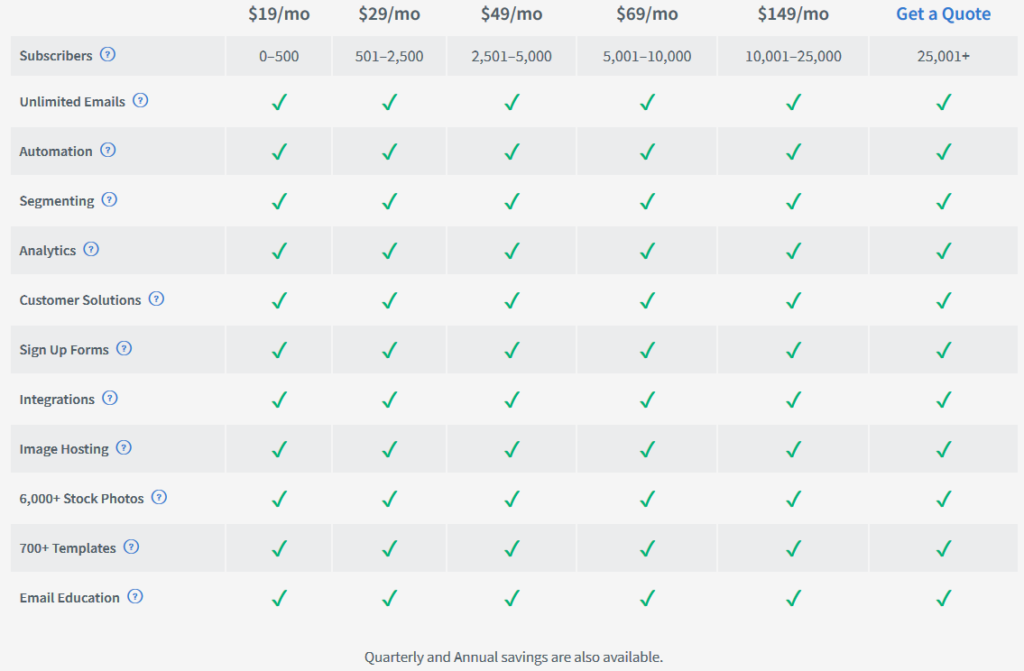
As you can see there is a lot of features integrated at all levels.

The pricing structure is based on the number of subscribers you have in your account.

Aweber is by far the most known platform in the Internet Marketing space and it integrates with a LOT of products.


As Aweber themselves they have so much integrated with their own platform, this makes it an attractive solution for many email entrepreneurs.

This Aweber review would not be complete without a rundown on how to use it.

It is simple to start a campaign and in a bit, we show you how that is done.


Aweber as a company wants to help you succeed mailing your customers so they are giving away this PDF on what to write in your emails:

Click To Grab Their Constructive Email Bible: HERE.


So let’s take a look inside and see what you get.
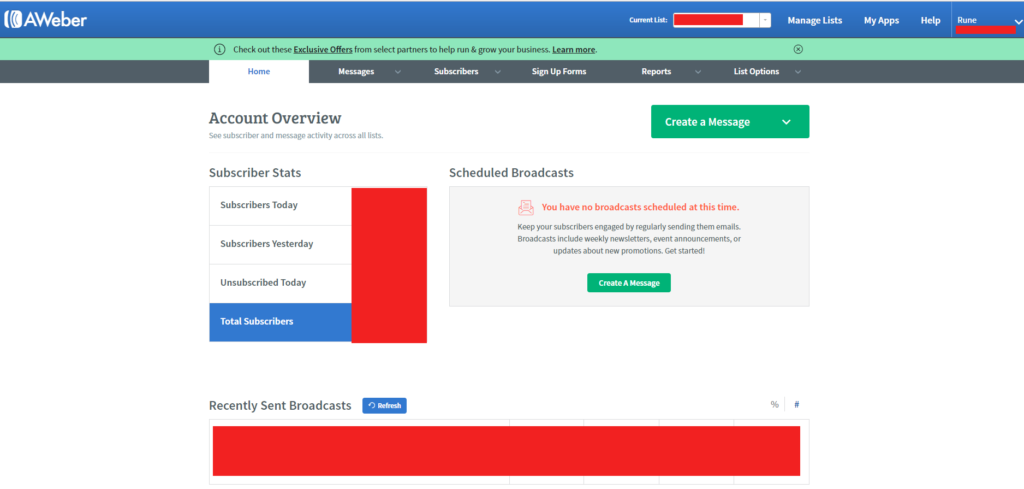
aweber-review-dashboard1

When you log in you get to see this dashboard. Without the red squares of course.

They are just there to protect my information 🙂

The GREEN button is a good place to start. Click it and it looks like this:
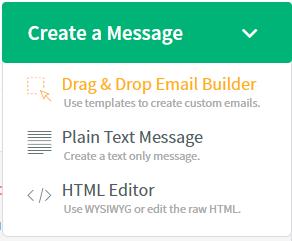
aweber-review-broadcast

You want to use the Drag & Drop Email Builder in most cases. It’s what I use for every email.

Clickin’ it, you get to see this screen.
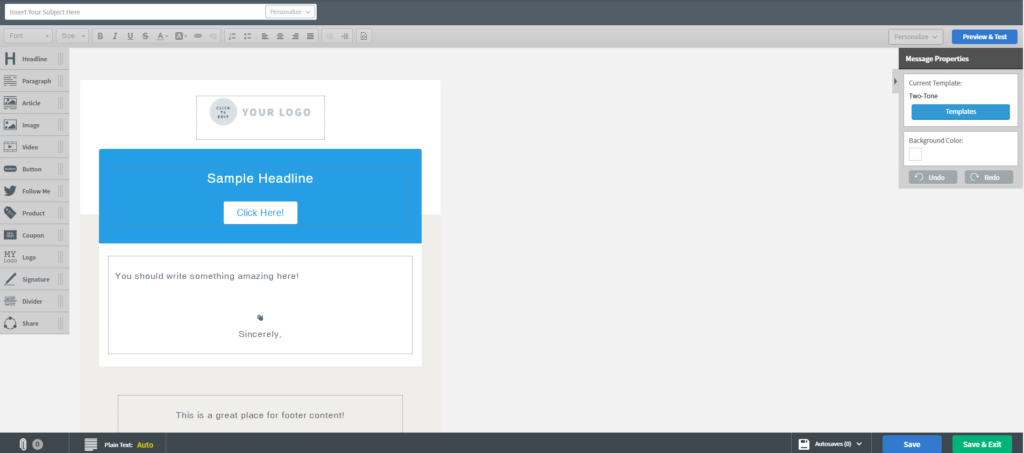
aweber-review-email

On the left, you have your options to add to the email.

Notice I am using a certain template named Two-Tone for this example. On the right side of the screen, you can select a variety of templates to either use as is, or configure the way you want them.

The email builder we are looking at here is very versatile as well, so as mentioned on the left side you can see a number of elements which you can include in your design.


You can, of course, include images, links, headlines, video and much more.

If you need a resource on what to write again you can use the PDF from Aweber or get some material from someone you like and trust on the topic.

On the right side here you can see some of the high converting good looking templates, there are many more.
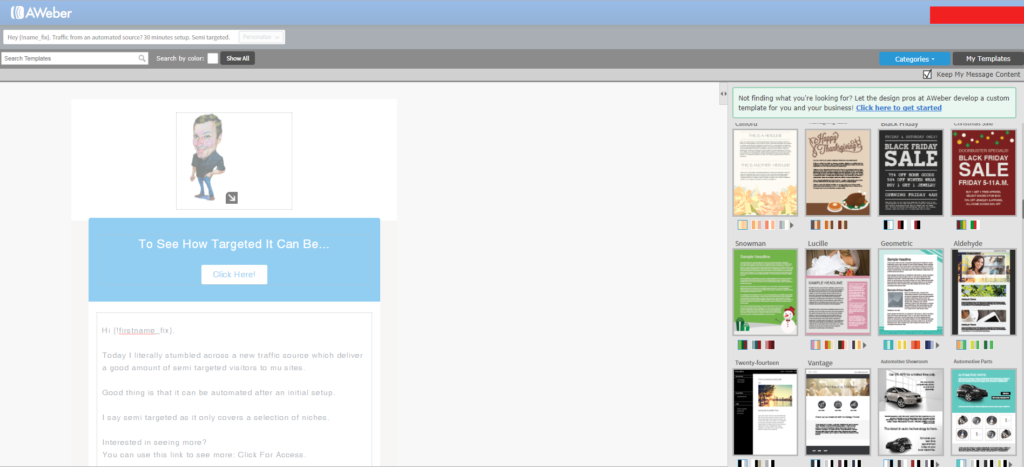
 

aweber-review-templates

You choose your own style.

As most modern autoresponders you can personalize the message with the names and more to the appropriate subject.

When ready, go to the next step and you will see this screen. Here you can press SEND OPTIONS and send a test email to yourself to see if the formatting looks the way you want it to.

You can also SCHEDULE a broadcast to go out at any time you wish.

And, you can add the message to a follow-up series.
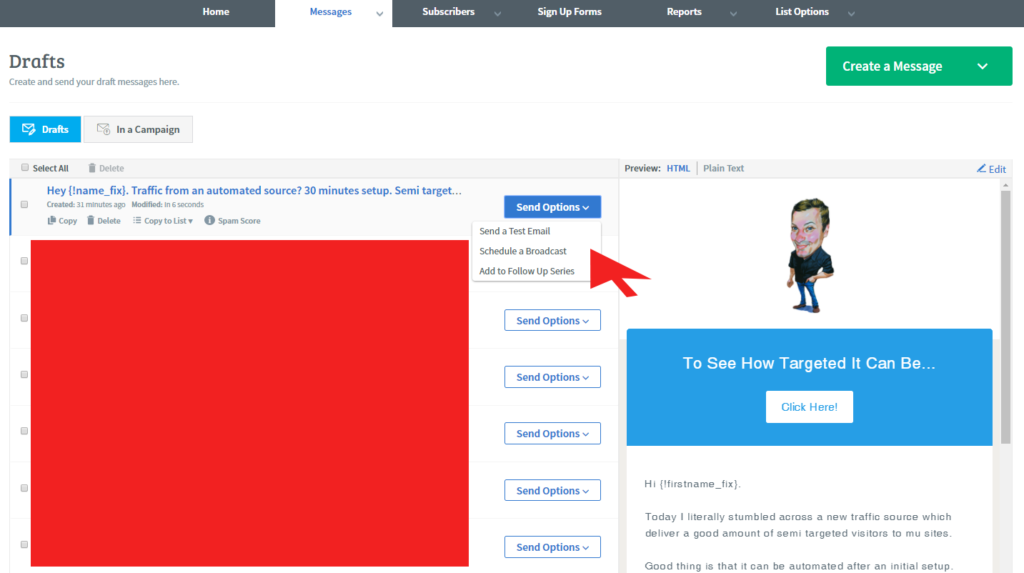
aweber-review-broadcast2

When sending this in a broadcast you can specify the time to send and what list or persons to send it to.

You can also have a look at your subscribers and manage them from here:
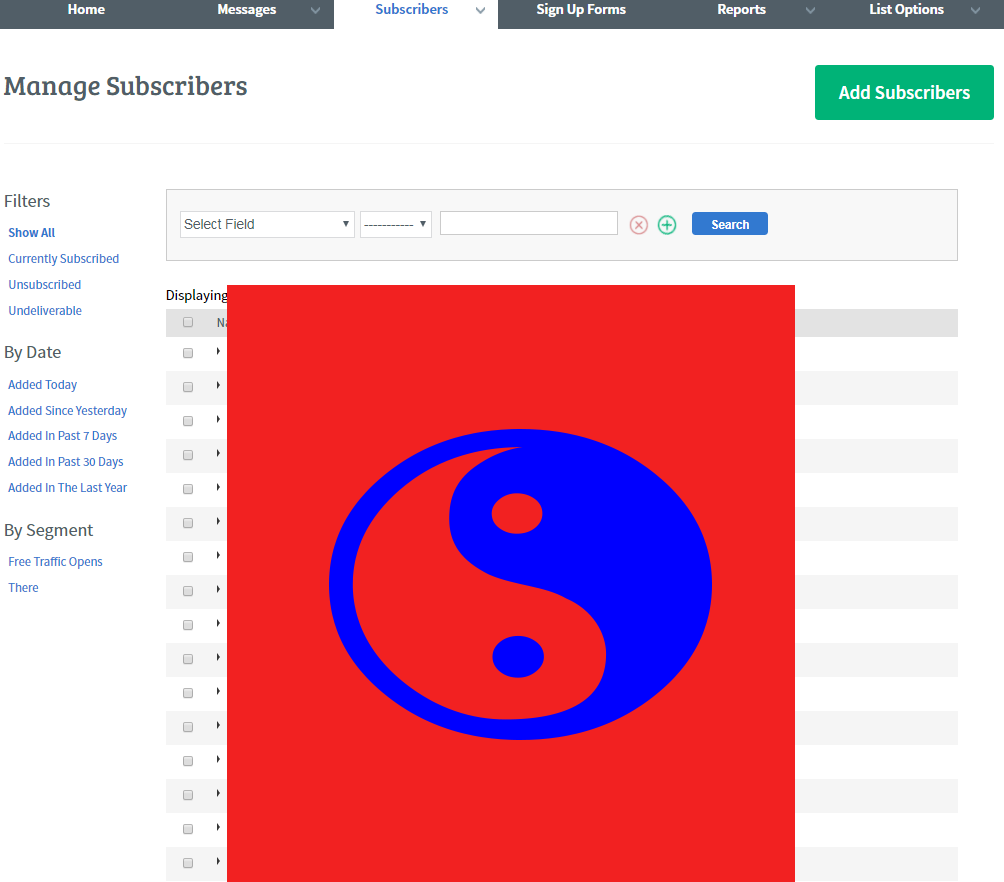
aweber-review-subscribers

When going to Optin Forms, you see your stats and also you can click a button named, Create your opt-in form:
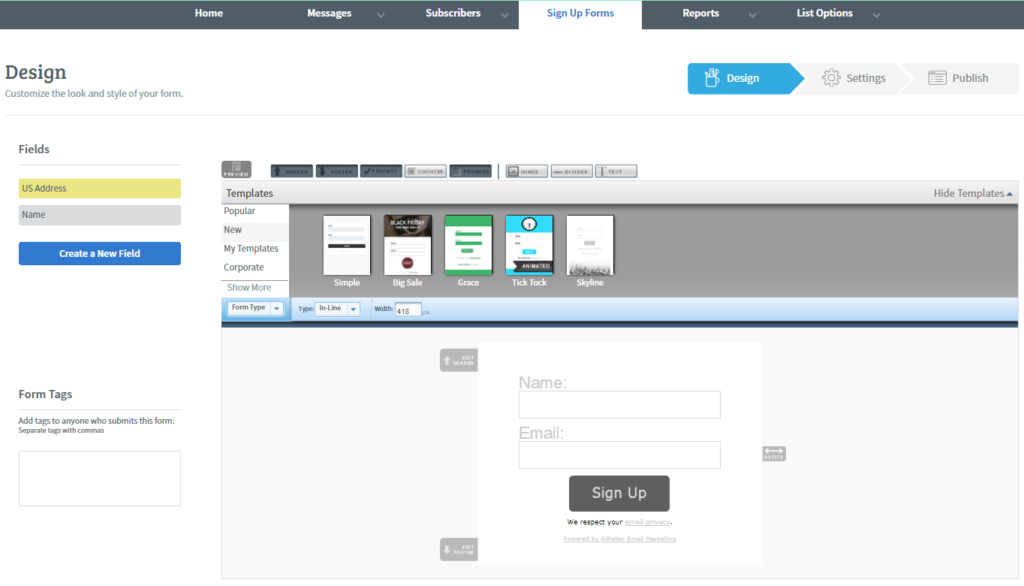
aweber-review-optin-forms

This allows you to make your own design for the forms or choose between the ones they have for you.

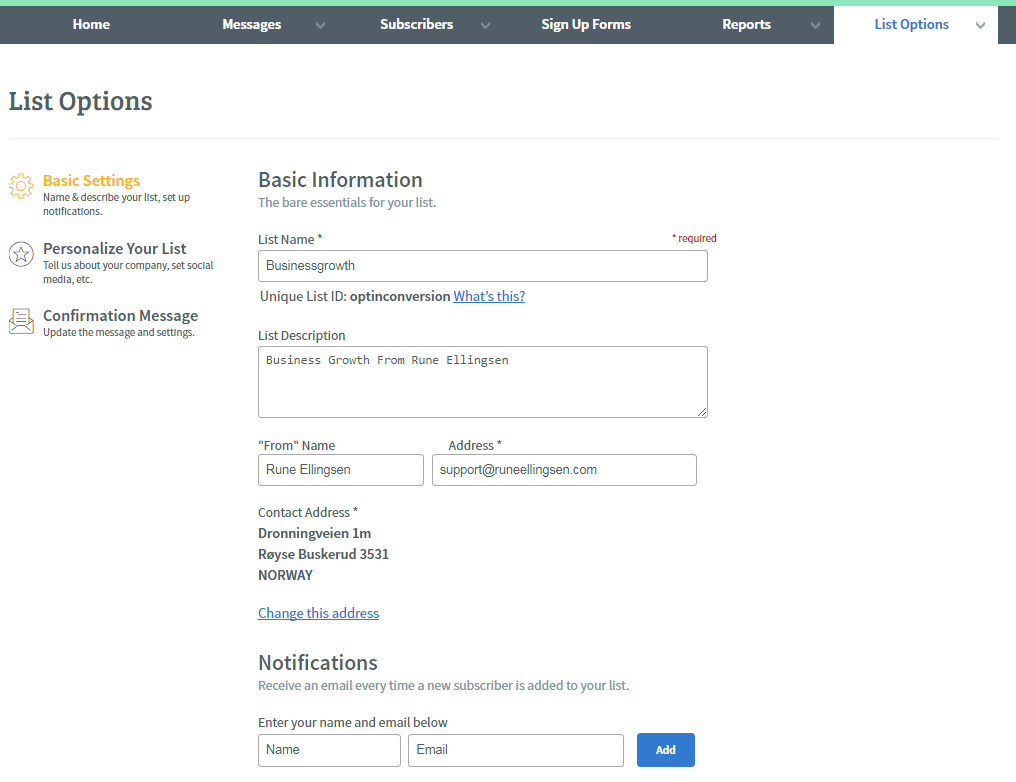
During the first time setup, you will need to visit the LIST OPTIONS and fill out the fields appropriate.

You will be guided through this process so don’t worry if you are new.
aweber-review-list-options

There are even more options inside of Aweber.

This Aweber review however, will not teach you absolutely everything inside, but merely, it shows you what you need to know.

Other areas you might want to look at is Manage Your List. MYAPPS. List Automation. And basically, anything else they have.

You can, of course, both import and export a list to them as well.

To round it off, they also have a very good support team with a dedicated team on phone and email.

Also, there is a section on a frequently asked question and a knowledge base.

You can be sure to be in good hands with this autoresponder.

We added the short video series for you below if you want to learn more about sending emails and growing your list in general.

It is a thorough course on its own for free, to you.

Just hit play.

Enjoy 🙂


Learn how to grow your email list in less than 4 hours with step-by-step, expert guidance in six short and simple lessons.

Start the course now


With this Aweber review, you probably should have enough information to see if it fits you as your autoresponder.
Filed Under: Copywriting, email marketing, Internet Marketing, List Building, Squeeze Page Tagged With: autoresponder, autoresponder review, aweber, aweber review, customer satisfaction, email marketing, email program, email software, follow up, list building, opt in, squeeze page

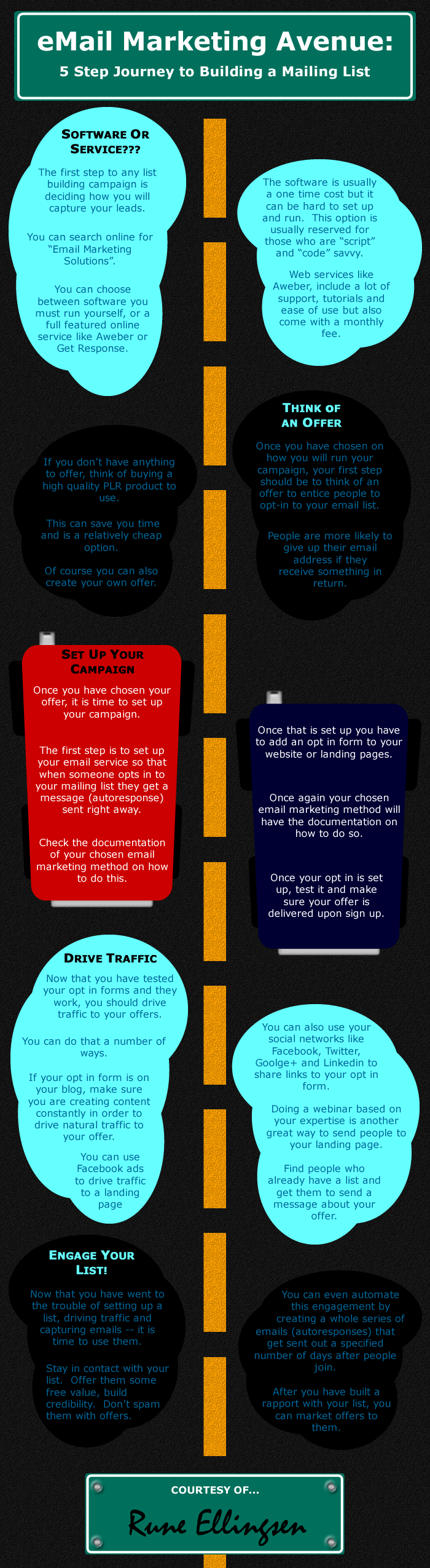
eMail Infographic that makes you go.. “huummmm..”

December 17, 2012 by Rune Ellingsen

infographic_email1
[Read more…] about eMail Infographic that makes you go.. “huummmm..”

Filed Under: Internet Marketing, List Building Tagged With: infographic, Internet Marketers, Internet Marketing, internet marketing infographic, list building, list building infographic

Awesome List Building

August 11, 2012 by Rune Ellingsen

Why you need to focus on some Awesome List Building!


  • Building your list is what EVERY successful marketer teach! And, with good reason.

The higher percentage of your income as an internet marketer will come from just that, your list.

So how and why is this so vital?

First the HOW:

  • For one thing, this is ONE of the very easiest ways to make bank as fast as possible without a lot of learning curves WHICH is a real drag, and sadly common in the internet marketing genre.

Then the WHY:

  • The easiest reason to why is the amount of time you save by focusing on ONE area in your business and then after a while, (actually really fast if you can leverage other people’s list, more on that later…) you will see some amazing results because of this ONE area of focus.

So while others usually spend years before they come to this conclusion that they should focus on one thing, I can tell you right away that THIS is the ONE THING that should be your main focus right from the “get go”. And ONLY this.

So if you feel like you could need some resources, let me hand them over:

  • We need a site of some sort and while you can use even a free site like from WordPress.com or a Squidoo lens or maybe even Blogger.com…  You should think of branding your business and that is where the paid options come in. You can start free if you want.

This site is hosted on WordPress and is not very customizable but enough to make a landing page.

All you need REALLY is a simple blank page (any theme should do) where you put an image, some text and an opt in form.

The first thing to do is to choose a domain name for your list building efforts.

Relate this to either your name… (For branding purposes, will earn you credit in the long run) OR find a name for your business site.

Preferably something easy to remember as you are going to include links to the site all over the internet.

You can use Godaddy.com Name.com or namecheap.com or any other registrar for the registration of the domain name.

Then I suggest Hostgator.com or Siteground (better) and the “Baby plan” if you are new and just starting out. For more advanced users I would suggest Amazon AWS for better bandwidth but only if you are having trouble with your server. Also for advanced users, I use Cloudways for managed hosting.

This rarely happens but when you are getting heaps and heaps of traffic then Hostgator baby plan is not the best option as they handle a lot of traffic. At least that goes for launches and serious hoards of traffic. Just keep an eye out for your site health when you drive traffic and you’ll be fine.

So after this, you need to setup your WordPress site by using the Fantastico option in Hostgator. Lot’s of training manuals on this i.e. Youtube.com

What I normally do is to setup a simple squeeze page consisting of a blank page at first. The way I do this is to delete EVERYTHING out of the ordinary for a squeeze page. What I mean is this:

  • Delete links to the theme. Usually in the bottom.
  • Depending on the theme you may need to go over a couple things to get Widgets out of the way. Usually on the right. You can choose a free theme as long as you do these steps as they will increase your visitor count staying on your site.
  • Deleting any links (as mentioned) that are present, and any text on the page.

You can see another example HERE. The copy is the one key takeaway to learn for making landing pages. – By the way, you don’t need to opt-in but you may want to see what kind of copy is being used and also color choices on the pages.

So, let’s assume your site is white and blank without anything on it.

What you now need is a free product to give away. I suggest you find a HIGH-QUALITY PLR product with giveaway rights to get things going fast.

The first thing to include on a squeeze page is a BIG BOLD RED Headline. Proven to work font is Arial. Georgia. Tahoma. + more… But please stick with easy at first.

In that headline, we need to use a couple of copyrighting elements that will ‘hook’ in the visitor’s interest.

We need these things to increase conversions to get a head start.

  •  Use scarcity as in, “will only be available for a limited time”.

( Just be honest and really mean it. Take the offer away after a while or change around on it so it really is limited. If not, don’t say it)

  • And underline a HUGE benefit with a yellow background.  (Color choices is another thing I will mention later in another post more extensively.)

Can use just plain color text here also. You have seen them all over the place, but if you analyze them you have a killer chance of achieving top results for your first squeeze page.

There is no one size fits all for landing pages. But they follow a pattern without necessarily using the same colors for every page.

  • BUT, a fair warning here.

Don’t overdo the analyzing just yet. Just follow my lead as this is supposed to be an easy start. You just have to get it going. I PROMISE!

So with a headline all you need know is a picture of your freebie. May it be a PDF or a video. Video convert very well also.

Fiverr.com is a good place to outsource work you haven’t mastered yet yourself.

AND of course an opt-in box on the left or below the freebie. You need a first name and an email by the way.

For getting that in place we need an account on Aweber.com. Free 1 dollar trial for 30 days.

So when have registered an account you create a welcome email where you do a quick introduction and deliver the freebie.

Also, we need a second webpage where you welcome your prospects and give away your freebie. This URL is needed for your Aweber account when you are asked for it.

And that pretty much sums it up. It’s a small funnel. You can get better results with more advanced funnels where you provide even more value. More on this later.

What you got as a result, however, was a Squeeze page to send traffic to. People opt in to get the freebie. You collect the email. They get redirected to the freebie… AND you have a list of people to market to.

Can you say Ka-Ching?

Obviously, there is a little more finesse in getting people to buy from what you send them as a service.


Ever heard of Pareto’s Principle?

The Pareto principle (also known as the 80–20 rule, the law of the vital few, and the principle of factor sparsity) states that, for many events, roughly 80% of the effects come from 20% of the causes.[1][2]

Business-management consultant Joseph M. Juran suggested the principle and named it after Italian economist Vilfredo Pareto, who observed in 1906 that 80% of the land in Italy was owned by 20% of the population; he developed the principle by observing that 20% of the pea pods in his garden contained 80% of the peas.[2]

It is a common rule of thumb in business; e.g., “80% of your sales come from 20% of your clients”. Mathematically, where something is shared among a sufficiently large set of participants, there must be a number k between 50 and 100 such that “k% is taken by (100 − k)% of the participants”. The number k may vary from 50 (in the case of equal distribution, i.e. 100% of the population have equal shares) to nearly 100 (when a tiny number of participants account for almost all of the resource). There is nothing special about the number 80% mathematically, but many real systems have k somewhere around this region of intermediate imbalance in distribution.

Source: Wikipedia.com


Basically what this means is that if you give content 80% you will reap rewards 20%. At least that is what my English grammar can explain for you  😉     Note: I am Norwegian after all… 😉

So to finish things off, there is your basic list builder. Turning it into an income machine will require content and promos related to your niche.

Follow up is the next step. You can read more about it in another post, coming soon.


There are tons of providers out there and you certainly won’t have to take my word for it if I say it’s good. I use what I found to be a good solution a while back after spending much time on it.

(see the whole hosting provider post I did here: this site’s hosting.)

And if you want to Google like I did… Then you’re in for a possible long research project. But if you want to use the insights gathered in this post then feel free.


Thanks for stopping by 😉

Filed Under: Income Stream, List Building, Squeeze Page Tagged With: income stream, Internet Marketers, Internet Marketing, list building, Pareto Principle, PDF, PLR, squeeze page, traffic

Primary Sidebar

Footer

Conversions

Without it, there is no business.

With little of it, there is little business.

With high conversions, we thrive.

Learn more about Conversions

Seeds of Success

Experts Aligned.

COMING SOON

Experts Network

Learn more about Seeds of Success

FREE STUFF

Coming soon

Coming soon

Coming soon

Learn more about free stuff.

Made with ☎ & ❤️ by Rune - Copyright © 2026 RuneEllingsen.com

  • Home
  • About
  • Resources
  • Contact
  • Terms Of Service
  • Disclaimer
  • Privacy Policy