• Skip to primary navigation
  • Skip to main content
  • Skip to primary sidebar
  • Skip to footer

Rune Ellingsen

Internet Marketing - With Rune Ellingsen

  • Book a free 15 minute call šŸ‘‰

wordpress

How to find the Best Hosting for WordPress sites 2016

March 29, 2017 by Rune Ellingsen

So how do you decide the best hosting for WordPress sites 2016?

But really, how to find THE ABSOLUTE BEST hosting for WordPress sites 2016???Ā This… Was the first thought before the investigation started… Then, the intense reading began.

There were some good ones out there, I know cuz’ I read A LOT of articles šŸ™‚

Read on for the skinny.

Best hosting for wordpress

Let me be the first to tell you that there is a lot to cover…

You have everything kept it in one article though, so don’t panic. šŸ™‚

(If you are an active reader and trust the writings on this site and want the quick fix, just scroll to the bottom and get to know the results from analysis of the speed from the different hosts.

AND to see the awesome hosting company which was picked for the job.)


Earlier this year we needed to find out how to find the best hosting for WordPress sites for 2016 and this is the result.


Content covered:

SHARED HOSTING. When you need it.

And MANAGEDĀ HOSTING. Which is what we recommend.

And NO, it is NOT THAT technical OR pricey!

In fact, it can be super simple.

Read on for the scoop.


What you should be looking for when in dire need of the best hosting for WordPress:

Regardless of size, really, you need a reliable hosting if you are serious about your business.

Smaller sites can be ok with “newbie hosting companies” but most of the time you want to be sure that your site is up and running ANDĀ for it to be fast.

This is so that Google will actually notice it instead of sayin’: “This site loads slow, drop rank…Next.”

And also so people would want to stay and read instead of getting sick of load times.

More on this below…

Background:

Time spent searching for the best hosting for WordPress 2016 AKA “The Solution”: Two months on and off. Last two weeks was intensified search.

Taking a business to the next level means checking to see if all aspects of your business model are congruent to the next level.

In plain English, if you expect a lot of traffic or intend to increase security then you must as we did check all of your factors for compliance.

One of the sites in my network had a malicious code in it.

To be more specific it was the theme on one site that had a bad line of code. The code itself was not doing much other than to leave your site wide open to get infected. (Kinda “dumb” to leave the door open, right?!)

Best hosting for wordpress

Theme Covert Store Builder was the bad one. I contacted the authors of the theme and notified them asking how they can allow such a code to be in the theme AT ALL and from what I can understand their coder thought it was ok to leave it like that. Still, my security plugin did not like it ONE BIT. Neither did I.

After reaching out to them they stated that they would remove the bad code in the next update. Still, as a customer I have sent a lot of traffic to that site and they could have gotten infected so I quickly changed the theme AFTER A TOTAL cleanup which took me quite some time just to be on the safe side.

Best hosting for wordpress

Now, hosting was the topic, and it still is…

Contacting the Hosting company for help did not do much good as all they wanted to do was to charge nickel and dime for a cleanup. Seriously stay away from Sitelock. Check out the only other really good option here.

In short, we changed hosting for a lot of sites because a lot of them were still in a shared environment, which in essence means:

That you can get infected by the other sites on the same server as you.

It gets worse. Also in a shared environment, the speed of the site is fluctuating a lot since you and god know how many other people are using the same server and you never know if the next guy is driving a lot of traffic and/or using up resources from the server with scripts or too many plugins.

Even thought the infection hazard is there, it is not great, I heard…

But still, it would be better for everyone if the site you operate is as safe as possible.

Best hosting for wordpress

A total of two months were spent on and off with intensity higher in the last two weeks while searching the web for reviews and case studies and articles covering the best solutions for WordPress sites.

From all of that hard reading, I learned a lot which you can benefit from.


The main takeaway is this:

Small site, like a designer with a portfolio, can be ok on shared hosting. This is because the traffic is not that high on these sites in general as compared to a blog or e-commerce solution.

Medium to bigger site riskĀ loosing business due to fluctuating resources. So one second your site can be fast, and the next it can be slow.


– Ā For optimizing your site speed even further read this:Ā https://runeellingsen.com/speed-up-wordpress/


Question:

  • Can you afford to have a slow site when most people DO NOT hang around for more than three seconds in loading before they get bored and leave your property?

The answer depends on your business and is totally on a case by case basis.

Most people that read this post are involved in the business creation and preservation so this should apply to you.

If not then why are you reading? Ā šŸ™‚

You can check your own site speed over at http://tools.pingdom.com


So the basis for our search was reliance , speed, and security.

The cost was quite irrelevant but we took note of it as it is a crucial element to know.


Shared hosting.

Companies like Hostgator and Bluehost are owned by the same bigger company and is therefore quite similar to each other.

That being said, Bluehost scored higher than Hostgator. Still, this was not the best choice for shared hosting.

After all the time digesting material from others experience we found ourselves looking at the best shared hosting in detail.

The number of positive reviews was at the greatest with these folks and also with that being said, EVERYONE has bad AND good reviews.

Trust me when I say this was a common denominator with everyone and their mother.

BUT, Siteground was the overall winner of our extensive search on the best hosting for WordPress with shared hosting.

Best hosting for wordpress shared

Reason:

Still, this is shared hosting which I do not recommend to other than low traffic sites… But there’s a carrot on Siteground, if you like carrots that is.

The carrot or main tipping point which is good with these guys as compared to others is security.

On Siteground you have shared hosting environment right, but not regular shared. Let me explain:

You can share a server, but on that server, you have your files in a SEPARATE space.

This is special and something that will not let the other peoples potential malware hurt your files as they have no way of touching your files.

Big plus right there. Support is good in case you were wondering.

Best hosting for WordPress SHARED – is Siteground. Let me repeat that I do not recommend it to most people.


  • This is what is recommended for medium to big sites.

Best hosting for wordpress managed


ManagedĀ Hosting!


Best hosting for WordPress as far as we can tell for the Normal Joe and serious businesses is called Managed Hosting.

This is the TYPE OF HOSTING, not the provider.

A managedĀ hosting account means in essence that you have your own server which is all yours to use.

In other words: MUCH better speed and security right off the bat.

This was an area that we did not know all that much about when it came to the nitty gritty details.

From past experience, we have been using CDN networks like MAXCDN which also can be used in the same manner somewhat.

What we are talking about here is Amazon S3 and CloudFlare.


We have used and are using Amazon S3 to host files but not websites. It can be used for both.

Also, CloudFlare has been used by us to host HTML files for mobile ads. Tried it, walked away from it.

Do you like ads on your phone?

Please leave a comment on your thoughts to this below the article.


What did the web say?

google best hosting for wordpress

You can Google this for yourself if you want and see if you find the same as I did, but what I found was that almost everyone and their mothers, again…. Were speaking very highly of one company.

There is a HUGE number of providers for all hosting needs out there and we have taken what seem to be the most reviewed providers that have good support for consideration.

Who wants to get a new host that promises gold but vanishes after a month, right?

This is stable for this business even though there were a lot of different providers.

Still, when Googling Managed Hosting for WordPress I could not help but to be massively pitched the story of WP-Engine.

You have probably heard about it from before.

This was not our final choice though.


Keep reading to find out who the final awesome winner is.


WP-Engine is a company that pays out FAT commissions to their affiliates.

So if you google for the best hosting for WordPress with different angles, as in managed, dedicated, best or not and more…

You get a ton of sites promoting this in articles, videos and overall content.

You can easily see through the sales text with the glorified words and happy customers if you want.

There’s a lot of sites so take your time… We read the whole articles on god knows how many different sites, ranging from WPMU DEV and other WP oriented sites to smaller business sites, and more.

And also we read the reviews and comments to a whole.

So when I say that all have good and bad reviews this is where this originated from.

It was tough to find a credible source that was open for arguments which was transparent.

We did however dig though the mud and the final conclusion was this.

WP-Engine has got bad and good reviews. BUT they are a seemingly a good company that delivers what they say. At least that is the final conclusion.

This is even though some people have had bad experiences with them. This was not relevant as the numbers was too low and this is a big company with a lot of customers so they are bound to have some varied user experiences on their portfolio as well.

Best hosting for wordpress meh

Overall rating was good…. But not good enough for this cat.


Yes this may sound crazy to some but listen to this:


With WP-Engine you have limitations other providers don’t.

What we are referring to here is resources.

One site with a limited number of visitors will set you back 29 bucks.

ten sites add

1000 sites add

So in essence this will cost a lot more if you were one of the guys that had a huge number of sites that you intended to move.

But i’s not all bad. The service is heavily used so it might suit you… Still… I think you want to know the better solution which has been chosen for this site.

Almost there, hang on…


Other providers like Digital Ocean and Amazon S3 requires a more of a technical job and one should have a VA of some sort to do this, unless you are comfortable with it.

So this is seemingly the good solution but too hard or too time consuming for most to go into.


Most people just want to do their business and the hosting company should just be “not visible”. Out of sight, out of mind, right.

It’s an aspect of your business that you want to run smoothly in the background so you can focus on other areas of growth.


Moving the sites easily was also a criteria but something that you know you need to do either way so be prepared to learn some tech.

Given, if it’s the first time to migrate the whole site over to a new host.


We usedĀ ManageWP so moving the site would be easy enough though.

As it turned out, it was not needed šŸ™‚


Conclusion

Still theĀ FINAL VERDICT fell on this company which also made the migration easy as counting 1-2-3…

After creating an account and setting up a WordPress environment You just install a plugin on your site and it will do the job more or less for you after your details have been filled in.


Best hosting for WordPress 2016 in our test was… DRUMROLL…


Cloudways

Best hosting for wordpress 2017

What is “Cloudways” and why are they the winner?


Cloudways works as a middle man between you and Digital Ocean or Amazon Web services AWS, Vultr, Google Cloud Platform Live and KYUP.

Cloudways gives you the ability to get real fast dedicated servers WITHOUT the technical aspect of it.

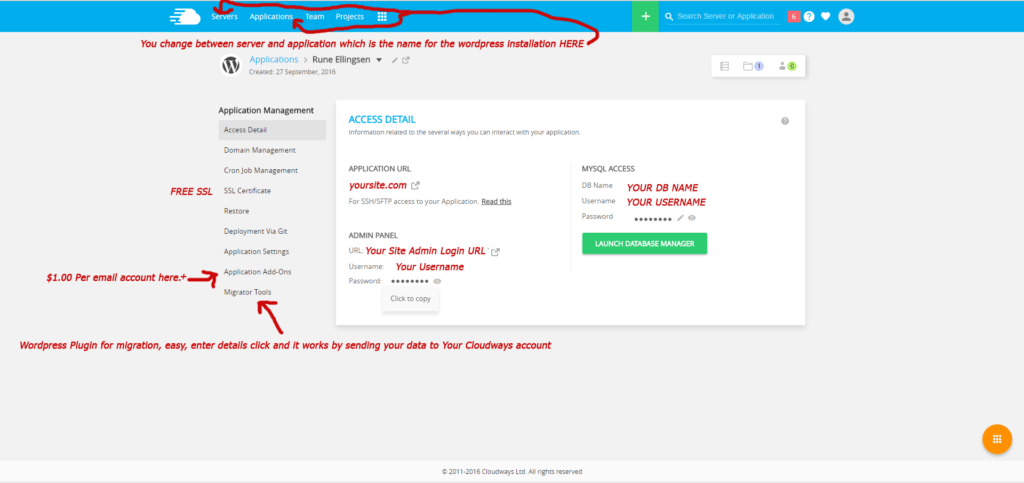
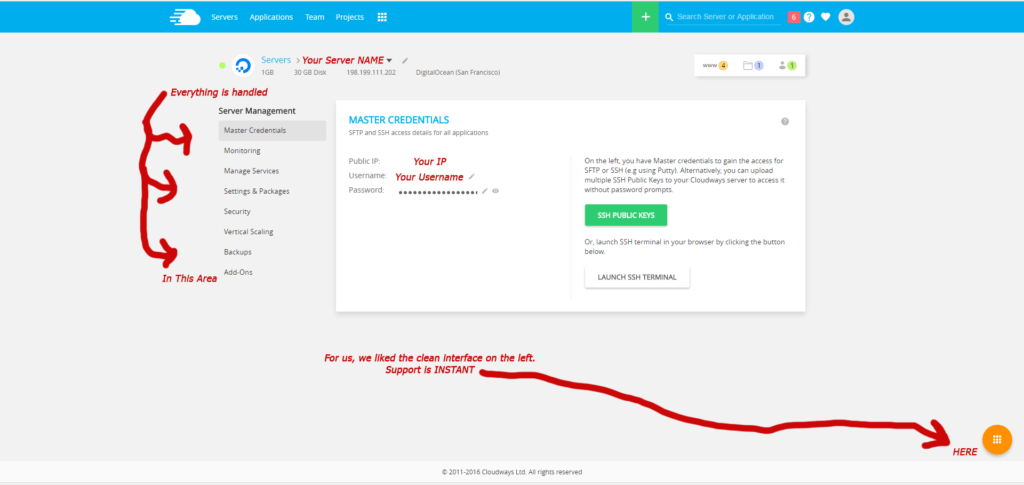
This is not done with Cpanel so some will be put off just Ā by that but rest assured the control panel is smooth. See below.
best hosting for wordpress 2016

best hosting for wordpress 2016


Not having a Cpanel makes this even more attractive in my opinion.

Having Cpanel installed will take up resources from your server and the solution Cloudways are bringing is also” imo” really really smart and intuitive.


So you have a big engine, what about the cost as compared to others like WP-Engine…?


Well… Having used CDN before we knew this model of pay for what you use, as you go along.


So with one server and two sites installed the cost was a mere 12 bucks per month for the first go.


We need to add some more content and ramp up some traffic to see how the numbers stack up in the end but this is a really cheap solution since you can install as many sites you want on that server!

So instead of one site limited to 20.000 pageviews you have as many sites as you want with dynamic pricing and EASE of upgrade to your server should you feel the need.


It’s as simple as dragging a bar from one side of the screen to the other. Can you get more easy fix than this?


Support is INSTANT.

Yes!

INSTANT!!! SO AWESOME!

(After writing this post, wait time has been at worst 30 seconds. It’s usually 1-5 seconds.)


With Cloudways we had to adjust to the new control panel, which is so simple and un-confusing, but still new so therefore I had some questions and I must admit I was taken by surprise when I contacted support via chat and the response was there right off the bat.

No waiting at all.

Why look elsewhere, right?

Support could easily help out with the issues and the transition to this new control panel was “too easy” one might say. šŸ™‚

Really pleased with how it worked as I think this will be the hosting for the future for many.

This was due to the speedy AND simple process.

All in all migrating one site took what? Minutes…?!

This depends greatly on the number of files you have on your site though. Some sites take longer than others, but moving them with the plugin provided Cloudways was a “high speed breeze”.


Getting acquainted with the control panel was easy as mentioned, real newbie style easy.

So for anyone on the fence wanting to ramp up to a better hosting this is one serious contender to consider.


Other gold nuggets:


  • Free Let’s Encrypt SSL.

Yup. FREE SSL. This certificate can set you back anything from free to 60 bucks or 200 bucks and more depending on your needs and provider.

But it is free.

  • FREE TRIAL

For sure! They offer that you test them out for free. Doing this allows you to check the interface and more.

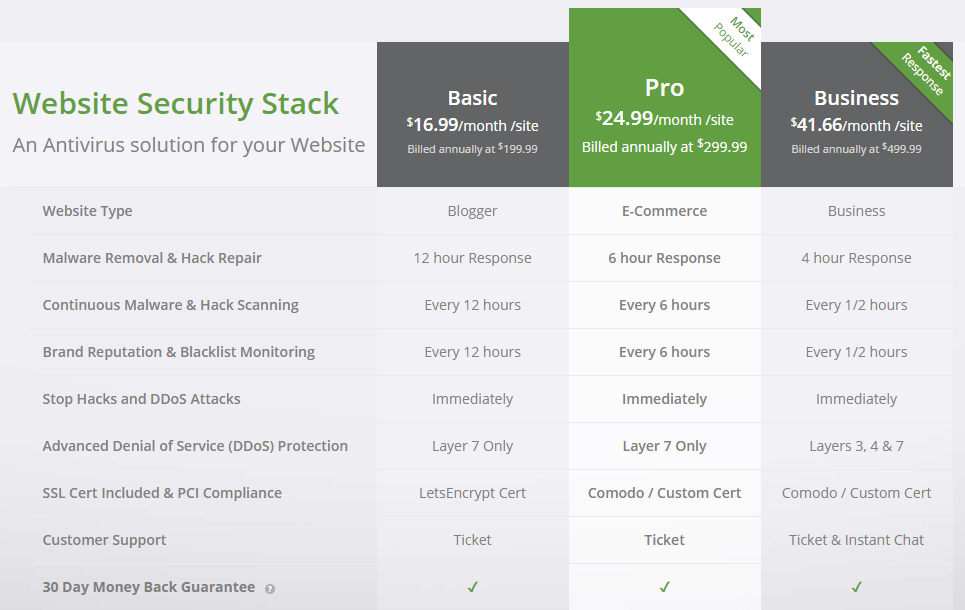
  • You can also get a massive discount for Sucuri Ā Firewall with a new account when signing up with Cloudways. See below.

Steps to get this, just get your account first, and then go to the article for setting up antivirus, or website monitoring to get the link.


ThisĀ area in BOLD is fetched from Cloudways website:

Antivirus + Firewall Basic – $149.99/year -25% off Sucuri price (you pay $199.99 to Sucuri, and we give you $50 as Cloudways credit)

Antivirus + Firewall Pro – $224.99/year -25% off Sucuri price (you pay $299.99 to Sucuri, and we give you $75 as Cloudways credit)

Antivirus + Firewall Business – $374.99/year Ā -25% off Sucuri price (you pay $499.99 to Sucuri, and we give you $125 as Cloudways credit)

Note: This promotion is valid for one site for each Cloudways customer.


Underneath in the image you can see REGULAR SUCURI PRICING without discounts.
best hosting for wordpress and sucuri pricing complete


I can also add that you have easy access to settings like file upload size and execution time and much more from your sever panel.

Great help if you work with images or larger projects. You can easily set this right so your site loads faster.

Cloudways server start at a measly $7.00 per month.

You can check their pricing below

best hosting for wordpress pricing


Check out what Forbes.com wrote:

“Cloudways is an interesting company because it is in the process of moving from a service offering, where every deployment is essentially a custom one, to a far more productized approach.”
Ben Kepes

More reviews and details on their site here.

http://cloudways.com

Plus they have more reviews from Venturebeat, 451 Research, CloudTweaks and Review SignalĀ is in place in case you need even more trust signals to lean on.


  • In total:

Two months and an intensive last two weeks of searching for the best hosting provider for WordPress led us to managed Hosting from Cloudways.

And we are REALLY happy to have made the switch.

  • This company has all you need to get FAST and RELIABLE, as in, what you would expect from one of the bestĀ hosting for WordPress sites available. (No.1. In my opinion)
  • Also it comes with a FREE TRIALĀ period so you really can test out moving a site and see if it is for you.
  • They also do run specials from time to time with discounts – At the time of this writing, you can enter: and get 15% off the yearly:-)

Love the platform.


It was so quickĀ to get a site moved and up and running so you get the feeling that you are in the right place and these guys know what they were doing.


For those that wonder why I have not included all the blogs and websites we read the numerous reviews from… There were simply too many to add.

And also wanting to write the post after testing the host for its use lead to lack of links for you as it was a huge number of them.

Would be uncool to write a review just from reading and not from testing when it is so important of a post for you and for me.

So the history in my browser will tell you what sites I went to but there are simply too many. šŸ™‚


“Cloudways is now rated among one of the best providers of Managed Cloud Hosting for online applications. With over 150+ cutting edge features, 24Ɨ7 after-sales support and 99.99% uptime, we have grown big and have been able to capture a good customer base. We owe this success to our customers, the Cloudways team, uncountable cup of coffees, and donuts.”

You canĀ possibly see why we named them the best hosting for WordPress 2016, and for 2017 also.

They are here to stay.


The Difference. 1.

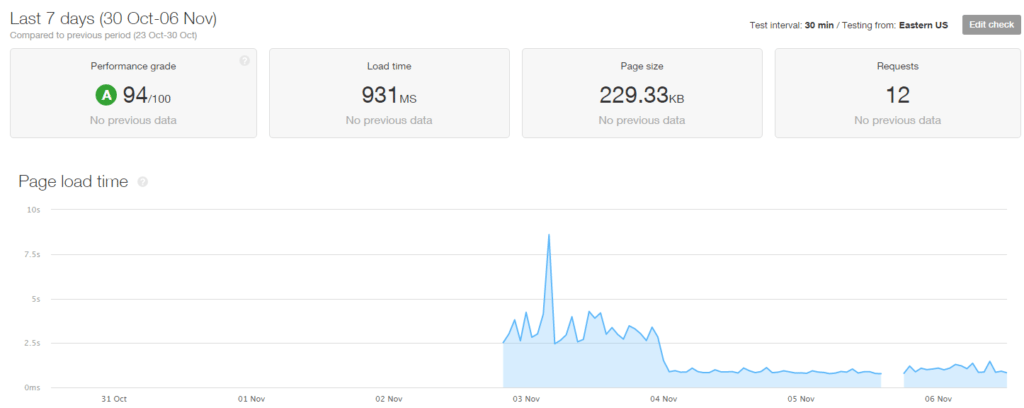
We took a test with pingdom.com and here you can see the results.

The first image is lying “just a tad”, because we started the test with our old host and monitored it for 24 hours.

Avg median time was 3 secs. (When testing without median time the waiting time would go up to over 8 secs and sometimes more)

In this image, the median time is slightly affected by the slow host from the first day. See the image underneath this one to see a clearer view.

best hosting for wordpress speed

The Difference. 2.

Here you can see the overall change very visually:

Remember that this is for a short time period but you can see clearly that the shift of hosts did a lot.
best hosting for wordpress speed


Worth mentioning is when you migrate your site and look up how to change cname records… YOU NEED to add A record also.

It’s a small step. BUT, if you are having issues, let me know and I’ll do my best to help you get your site running.

This guide was based on facts and extensive research from our side and ours and others user experience.

Since we spent so much time on it we thought you might like to read this from someone instead of taking a ton of hours in front of the computer reading like we did…

 

Let me know what you think in the comments below.


Have any other options you think I should have covered?


Again, to get our choice of the best hosting for WordPress 2016 you can reach them here: Cloudways.com


Save

Filed Under: Internet Marketing, Wordpress Tagged With: cloudways, hosting, managed hosting, pingdom, shared hosting, site speed, sucuri, wordpress, wp engine

Affiliate Sales Increased with Reciprocity

March 27, 2016 by Rune Ellingsen

Reciprocity and the Law and Science of Persuasion in Affiliate Marketing.

Reciprocity is a concept that you should be familiar with as an affiliate marketer if you want to increase your affiliate sales.

Simply because if you learn the science behind the reciprocity concept you will understand how sales are made and how the art of human psychology can help you make more money.

better roi

In general all the average affiliate marketer does is try to present his pitch to the readers and hoping that some of them will end up buying the product he is promoting.

While this works perfectly most of the times, it won’t yield a high conversion rates all the time.
This is simply because the fact that…

People don’t always use all the information available to them in order to make a decision, that’s the harsh reality.

Instead people depend on certain rules and shortcuts that guides them into taking any decision.

One of these shortcuts and rules is Reciprocity.
Reciprocity is one of the basic concepts in the science of persuasion, which basically helps you as an affiliate marketer understand how to make people take a certain decisions, like buying your affiliate offer.

I am going to explain the Reciprocity concept and how to implement it in your affiliate marketing efforts to increase your sales and make more money.
The science of persuasion tells us that reciprocity is the obligation to give when you receive first.

So a real life example will be, when a friend invites you to his birthday party (you receive) then you feel obligated to invite him back to your birthday party (give).
If someone did you a favor then you feel the need to return the favor to him/her.

This all leads us to the rule that people are more likely to say “Yes! To you when you give them something first.

Science of Persuasion; Reciprocity can Boost your Affiliate Sales - idea

Of course people will not say yes to anything just because you gave them something first, you must ask them or expect from them something reasonable.

Also it might not be as easy as:

ā€œI give someone something then he will be obligated to agree to do something for meā€.

You have to consider how you are giving something to that person.

For example, when a waiter brings you your bill in most cases you will pay the bill and pay him a reasonable tip.
But if that waiter gave you a mint with your bill then you probably going to increase his tip, and if he said to you ā€œthis mint is for you my best customerā€ then you will give him even more tip.

This shows us that the way you give something is very crucial even more than what you are giving itself.

So for reciprocity to work:
• You need to be the first to give
• Give something personalized
• Give something unexpected

How to Implement Reciprocity in your Affiliate Marketing Plan

Using what we know about the reciprocity concept, I am going to explain some strategies that you can implement on your affiliate page to boost conversion rates and sales.


  • Strategy #1

Select a profitable niche that you want to sell affiliate products in, and then build a blog filled with content and perhaps free training course.
Try and promote this blog to get as much readers as you can. Over time you will see that all your blog posts got tons of likes and retweets which gives you more social media exposure.

And after sometime put an ad for the products you want to sell as an affiliate.
Because at this point many of your users will be regular visitors to your blog, and when they finally see a product that you recommend they will feel the need to buy it because you were so generous to them across the time they have been visiting and reading your blog.


  • Strategy #2

In your affiliate product review page tell your visitors to download something that goes well with the product you are trying to sell.
For example:

If I am selling (as an affiliate) a wordpress plugin related to SEO then I will offer them a 15 pages pdf guide on SEO as a bonus.

But his bonus will be given to them before they buy the actual product.
Here I was the first to give, and I did something unexpected because I gave them a generous bonus before they even buy, and it was personalized because it helps solve their problem and it goes well with the product they are considering buying.


  • Strategy #3

You know how nowadays every ebook, guide, software out there can only be downloaded if you opt-in or provide your email address, as much as that work it is still annoying to have to be the one to give first in order to take.

Try offering your PDF guide without an opt-in and tell your visitors that download doesn’t require them to give their email.
When you do that, at this point people feel how generous you are and how unexpected this is which is very important factor in persuading them to buy your affiliate product.
So what you do is at the end of your PDF guide, you mention the affiliate product that you want them to buy and introduce it in 1 paragraph.

People will feel the need to return you the favor of giving them something for free first.


  • Strategy #4

If you are promoting a software product or service, then try to contact the product owner and convince them to give you a version of the product that you can give to your visitors.

Except this version should allow a trial usage for free.
It has been known that when people are given the product for free for a period of time, they end up buying it at the end. They feel how generous you are and they may end up falling in love with your affiliate product, and that is more persuasive then any word you can type.


  • Strategy #5

In your blog, try to organize a monthly events and training sessions for your readers.
You can see Google hangouts or Skype group video chat for that or even any online webinar service that will help you host such events.

These events are amazing for selling affiliate products, because you get very personal with your audience via video or audio and you spend like 1 hour giving them advice and tips and tricks and at the end you sell them your affiliate product.


  • Using any of these strategies or even developing your own strategies that implement the reciprocity concept can really add a huge improvement to the way you do affiliate marketing.

These changes are cheap and not time consuming yet they can bring you more money.
As an affiliate marketer I think you should always try to find ways to convince people to buy from you as it mounts to higher conversion rates.

Also there are many other affiliate marketing techniques you can learn from this one. Combine them with what you have learned here so far and you can see sales increase.

This has been a guest blog post from Ibrahim Dahy of:

affset.com

A product first released on clickbank.com

This post dove into the Law of Persuasion and the Law of Reciprocity.

Save

Filed Under: Affiliate Marketing, Conversion, Internet Marketing, Sales Psychology Tagged With: affiliate marketing, conversion, guest blog post, Ibrahim Dahy, Internet Marketing, Law of persuasion, Mindset, PDF, Reciprocity, sales psychology, SEO, visitors, wordpress

Speed up WordPress

December 4, 2015 by Rune Ellingsen

Speed up WordPress with ease.


Speed up WordPress as soon as possible for your overall conversion.

Having a slow site affects your visitors experience.

You should really go the extra mile if you are a serious webmaster and take some steps and learn how to speed up WordPress for your own sites

If you read this then you should have a WordPress site or an interest in getting one.

Either way in this post I will share with you some of the tweaks I have done to speed up some of my sites.


First off you want to investigate WHY you would want a website with hypersonic page load speed.

speed up wordpress

Compared to a slow buggy design which loads and loads… and loads.

speed up wordpress 2

Truth is that most people abandon your site if it loads too slow.

Google states that anything OVER THREE SECONDS load time will repel your visitors. Take note of that.

So having a fast site REALLY matters in your overall experience to the user.

This affects clicks, trust,engagement andĀ conversion as a whole, so it’s kind of a big deal.


We use a online tool called Pingdom for our initial testing to see how we perform with the settings and plugins installed.

From there you can enter your site URL and see how it performs compared to other sites they have measured.

Ways to speed up your WordPress site:

No.1.

To speed up your WordPress site from the get got it is worth mentioning that your server has something to say.


We use more than one hosting solution in our business and at the time of this writing we are using Hostgator.com for this site you are on.

Now the numbers vary, a lot. Reason is that we are on shared hosting.

When on shared hosting you can expect varied amount of resources being used by others and that affect your sites performance in the terms of exactly, speed.

*** JUST MADE A SWITCH – Now we use this other company. Read the details here: https://runeellingsen.com/best-hosting-for-wordpress/

It is much, MUCH better! AND it’s cheap!


Wanting to get better performance on my sites I went out and did my research.

I Googled some blogs that I was following which I knew did a LOT of blogging, hence the focus on a high performing site.

Spying on the fast websites with online tools I was able to find a couple of things in common for the fast loading sites.

First thing was that they used a really really fast server. For WordPress sites the common denominator was servers from WPEngine. These are servers made for WordPress sites.

Got WordPress and need fast hosting then you CAN check them out.

Would advice against it though, read why here:Ā https://runeellingsen.com/best-hosting-for-wordpress/

Anyway they and others like them specialize in getting your site fast as it has been tweaked to fit into the framework more than many other solutions.

Other options include but not limited to Amazon S3 hosting or other CDN solutions such as MAX CDN which is recomended by none other than the creator of Yoast. The no.1 SEO plugin for many.


So server speed is vital for aĀ  really really quick site!


This is however NOT needed for everyone, as this site and many others do OK with shared hosting. But a site that receives a lot of hits may need to rethink their options when it comes to server speed in order to get the most visitors to stay on your site rather than bouncing off. You want to keep user interaction as high and motivated as possible and that is done with responsiveness.


No.2.

Speed up WordPress with a clean WordPress theme.


Your WordPress theme can be fast from the get go, OR you may have something more complex of a theme which requires some more resource off the bat.

Visual elements such as slider, images, videos and scripts can really slow you down and if performance is your thing then look for a fast light weight theme to do the job.

I can recomend Genesis Framework and a theme from Studiopress (These two Genesis framework and in my case Corporate Theme goes hand in hand. You can use the framework only also)

Also the 3 Clicks Theme is another contenders I have used personally. I got hold of these themes after doing a lot of research on the subject and just recent I had to go over this topic and I can happily say that these two themes gets the overall high score from a lot of site owners.

Difference is that Genesis is built upon a lightweight framework which you can customize to your own pleasing. But it is a little technical for newcomers.

The Three Clicks theme is also built fairly lightweight but offers a more click and drag option when it comes to designing your pages. This feature makes it a bit slower but both themes score highest as far as I have seen.


You can see the Genesis Framework with the Corporate theme in action here by the way: http://getgoodseo.com

Please bare in mind that this is just for educational services only and the site mentioned needs attention in regards of graphics and fresh content.

This site was the first I built with success so it had it’s period of shine but I moved on to other things and let it stand there un-updated for a long while.

It’s more of a testing ground waiting to be transformed into something new.

Right now I have changed the theme over to Genesis so it is fast. It will get more attention real soon though.


Sadly I have no sites up and running with the 3 Clicks Theme but if you visit their site you can see how it works and it looks real good after some tweaking. See their site here: 3 Clicks Theme DEMO

There are a bunch of WordPress themes out there and there are others that are fast also.

If you are looking for something else then be sure just to see how fast the theme you want is compared to others.


No.3.

Speed up WordPress with less plugins.


To check to see what slows down your site is drumroll… Your plugins.

Now, having a lot of plugins will obviously slow down your site, simple math will allow you to grasp that.

But what you did not know perhaps is that many of the plugins can be removed as they do not offer any great value for you.


Now all blogs are different in some way and people change around on what they use according to their needs for the particular site.

But the “red-thread” here (meaning the common denominator) is that a lot of high performing blogs use the same initial plugins to start with.


The plugins mentioned in this post are here to speed up WordPress.

Sometimes you need more than these but using these as a “core must have setup” for your blog will at least give you a solid ground for high performance off the gate.

Other stuff can be modified as your needs may require it.


For a new blog you can easily start off by Googling what you need and add +lightweight or +performance into the search command to get some good ideas.

Like this example: “lightweight wordpress theme”.


For an aged blog this is what we do:


  • Search inside your WP Dashboard for all plugins mentioned by the way.


Install the plugin called P3 (Plugin Perfomance Profiler) by Godaddy.


Run the plugin.

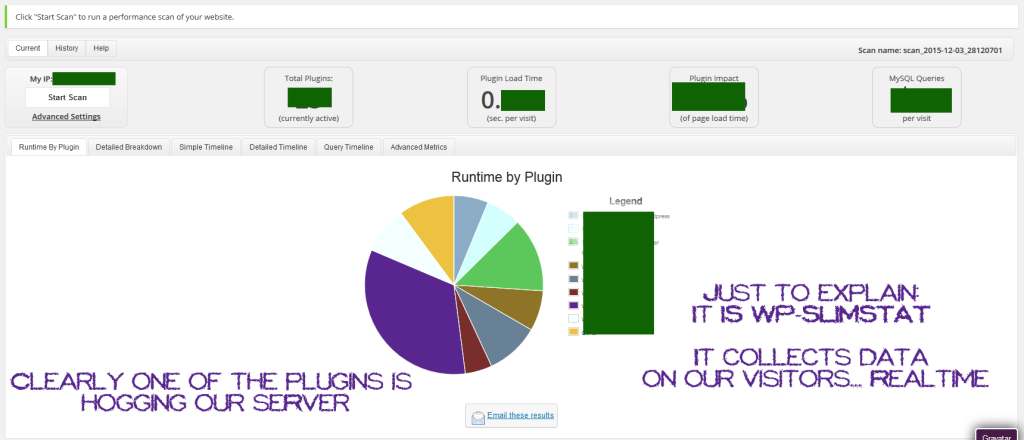
This will let you know what plugins you use that are causing your page load speed to be slow.

Outdated plugins with old code should not be used due to several factors but mostly security. They also tend to slow or even mess up your site.

So be on the lookout for that when running the plugin.

speed up wordpress plugins


After you have run the plugin you can clearly see with the graph what plugins is causing you site to slow down.

Options would be to remove or replace the ones that you want.

When that is done you are on good way for a better performing site.


So the best WordPress plugin to speed up website is related to your cache.


The plugins we use on most of our blogs for speed is:


WP Super Cache which is an overall speed enhancement plugin.

A lot of options and a must have plugin.


Also worth mentioning is W3 Total Cache which is a similar plugin. Totally a personal choice which one to use but with our new host we use this on most sites.

Using WP Fastest Cache on this site at the moment though. Will change to W3Total Cache soon because of the new server. It fits better.


If you however use a LOT of images they can be also a huge drag on your resources as they load slow.

If you use Photoshop then you can choose how to compress your images before saving them and the smallest compression size will do for your images.

The quality of the images remain.


IF NOT however you are using that you may have some images that are too big.


To fix this we have the plugin:WP-Smush.

It let’s you downsize the images you upload and the quality stays the same.


Just to give you a feel of a slight more technical thing you can do toĀ speed up WordPress is to use Lazy Load to only load images which are visible without scrolling.

When scrolling it loads the images further down on your page keeping the load time at a minimum.


There are more technical steps to make your site faster.

This post however covers the generic but “not to miss” (IMO) steps that will give you a faster WordPress site.

Excluding the Lazy Load.


Also worth mentioning in regards to get page load speed fast, is clutter.

This kinda goes hand in hand with disabling useless plugins.

The steps we have taken to speed up WordPress on this site has been visual optimization also as we saw it as a benefit.


Our front page is filled with just a few posts.

You can use excerpts for a fast loading front page.

And limit what is on the front page in general.

Get rid of disturbing widgets.

Think simplicity.


When it comes to share icons on a blog, for social recognition we use them primarily on our Blog page and not the Front page.

Do your own testing to see what gives you the best results in terms of user interaction and speed.


We use YOAST SEO plugin also which has more benefits also when it comes to speed as it has features in it which you can find as separate plugins.

Keeping it in one place gets less load time for your site.


Hope you have enjoyed this post as your site gets faster by the minute by implementing the above suggestions.

Already have a fast blog? Great! Think we missed anything vital for getting a faster website? Please share your experience in the comment section.

Speed up WordPress today yourself.

Filed Under: Conversion, Internet Marketing, Internet Marketing Pro, Resources, Wordpress Tagged With: conversion, Internet Marketing, resources, wordpress, wordpress speed

Primary Sidebar

Footer

Conversions

Without it, there is no business.

With little of it, there is little business.

With high conversions, we thrive.

Learn more about Conversions

Seeds of Success

Experts Aligned.

COMING SOON

Experts Network

Learn more about Seeds of Success

FREE STUFF

Coming soon

Coming soon

Coming soon

Learn more about free stuff.

Made with ☮ & ā¤ļø by Rune - Copyright © 2026 RuneEllingsen.com

  • Home
  • About
  • Resources
  • Contact
  • Terms Of Service
  • Disclaimer
  • Privacy Policy