• Skip to primary navigation
  • Skip to main content
  • Skip to primary sidebar
  • Skip to footer

Rune Ellingsen

Internet Marketing - With Rune Ellingsen

  • Book a free 15 minute call šŸ‘‰

Conversion

Speed up WordPress

December 4, 2015 by Rune Ellingsen

Speed up WordPress with ease.


Speed up WordPress as soon as possible for your overall conversion.

Having a slow site affects your visitors experience.

You should really go the extra mile if you are a serious webmaster and take some steps and learn how to speed up WordPress for your own sites

If you read this then you should have a WordPress site or an interest in getting one.

Either way in this post I will share with you some of the tweaks I have done to speed up some of my sites.


First off you want to investigate WHY you would want a website with hypersonic page load speed.

speed up wordpress

Compared to a slow buggy design which loads and loads… and loads.

speed up wordpress 2

Truth is that most people abandon your site if it loads too slow.

Google states that anything OVER THREE SECONDS load time will repel your visitors. Take note of that.

So having a fast site REALLY matters in your overall experience to the user.

This affects clicks, trust,engagement andĀ conversion as a whole, so it’s kind of a big deal.


We use a online tool called Pingdom for our initial testing to see how we perform with the settings and plugins installed.

From there you can enter your site URL and see how it performs compared to other sites they have measured.

Ways to speed up your WordPress site:

No.1.

To speed up your WordPress site from the get got it is worth mentioning that your server has something to say.


We use more than one hosting solution in our business and at the time of this writing we are using Hostgator.com for this site you are on.

Now the numbers vary, a lot. Reason is that we are on shared hosting.

When on shared hosting you can expect varied amount of resources being used by others and that affect your sites performance in the terms of exactly, speed.

*** JUST MADE A SWITCH – Now we use this other company. Read the details here: https://runeellingsen.com/best-hosting-for-wordpress/

It is much, MUCH better! AND it’s cheap!


Wanting to get better performance on my sites I went out and did my research.

I Googled some blogs that I was following which I knew did a LOT of blogging, hence the focus on a high performing site.

Spying on the fast websites with online tools I was able to find a couple of things in common for the fast loading sites.

First thing was that they used a really really fast server. For WordPress sites the common denominator was servers from WPEngine. These are servers made for WordPress sites.

Got WordPress and need fast hosting then you CAN check them out.

Would advice against it though, read why here:Ā https://runeellingsen.com/best-hosting-for-wordpress/

Anyway they and others like them specialize in getting your site fast as it has been tweaked to fit into the framework more than many other solutions.

Other options include but not limited to Amazon S3 hosting or other CDN solutions such as MAX CDN which is recomended by none other than the creator of Yoast. The no.1 SEO plugin for many.


So server speed is vital for aĀ  really really quick site!


This is however NOT needed for everyone, as this site and many others do OK with shared hosting. But a site that receives a lot of hits may need to rethink their options when it comes to server speed in order to get the most visitors to stay on your site rather than bouncing off. You want to keep user interaction as high and motivated as possible and that is done with responsiveness.


No.2.

Speed up WordPress with a clean WordPress theme.


Your WordPress theme can be fast from the get go, OR you may have something more complex of a theme which requires some more resource off the bat.

Visual elements such as slider, images, videos and scripts can really slow you down and if performance is your thing then look for a fast light weight theme to do the job.

I can recomend Genesis Framework and a theme from Studiopress (These two Genesis framework and in my case Corporate Theme goes hand in hand. You can use the framework only also)

Also the 3 Clicks Theme is another contenders I have used personally. I got hold of these themes after doing a lot of research on the subject and just recent I had to go over this topic and I can happily say that these two themes gets the overall high score from a lot of site owners.

Difference is that Genesis is built upon a lightweight framework which you can customize to your own pleasing. But it is a little technical for newcomers.

The Three Clicks theme is also built fairly lightweight but offers a more click and drag option when it comes to designing your pages. This feature makes it a bit slower but both themes score highest as far as I have seen.


You can see the Genesis Framework with the Corporate theme in action here by the way: http://getgoodseo.com

Please bare in mind that this is just for educational services only and the site mentioned needs attention in regards of graphics and fresh content.

This site was the first I built with success so it had it’s period of shine but I moved on to other things and let it stand there un-updated for a long while.

It’s more of a testing ground waiting to be transformed into something new.

Right now I have changed the theme over to Genesis so it is fast. It will get more attention real soon though.


Sadly I have no sites up and running with the 3 Clicks Theme but if you visit their site you can see how it works and it looks real good after some tweaking. See their site here: 3 Clicks Theme DEMO

There are a bunch of WordPress themes out there and there are others that are fast also.

If you are looking for something else then be sure just to see how fast the theme you want is compared to others.


No.3.

Speed up WordPress with less plugins.


To check to see what slows down your site is drumroll… Your plugins.

Now, having a lot of plugins will obviously slow down your site, simple math will allow you to grasp that.

But what you did not know perhaps is that many of the plugins can be removed as they do not offer any great value for you.


Now all blogs are different in some way and people change around on what they use according to their needs for the particular site.

But the “red-thread” here (meaning the common denominator) is that a lot of high performing blogs use the same initial plugins to start with.


The plugins mentioned in this post are here to speed up WordPress.

Sometimes you need more than these but using these as a “core must have setup” for your blog will at least give you a solid ground for high performance off the gate.

Other stuff can be modified as your needs may require it.


For a new blog you can easily start off by Googling what you need and add +lightweight or +performance into the search command to get some good ideas.

Like this example: “lightweight wordpress theme”.


For an aged blog this is what we do:


  • Search inside your WP Dashboard for all plugins mentioned by the way.


Install the plugin called P3 (Plugin Perfomance Profiler) by Godaddy.


Run the plugin.

This will let you know what plugins you use that are causing your page load speed to be slow.

Outdated plugins with old code should not be used due to several factors but mostly security. They also tend to slow or even mess up your site.

So be on the lookout for that when running the plugin.
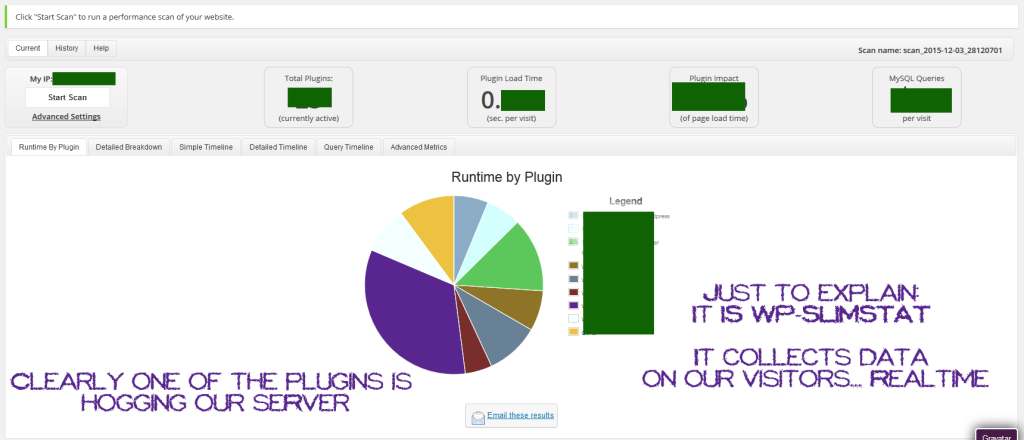
speed up wordpress plugins


After you have run the plugin you can clearly see with the graph what plugins is causing you site to slow down.

Options would be to remove or replace the ones that you want.

When that is done you are on good way for a better performing site.


So the best WordPress plugin to speed up website is related to your cache.


The plugins we use on most of our blogs for speed is:


WP Super Cache which is an overall speed enhancement plugin.

A lot of options and a must have plugin.


Also worth mentioning is W3 Total Cache which is a similar plugin. Totally a personal choice which one to use but with our new host we use this on most sites.

Using WP Fastest Cache on this site at the moment though. Will change to W3Total Cache soon because of the new server. It fits better.


If you however use a LOT of images they can be also a huge drag on your resources as they load slow.

If you use Photoshop then you can choose how to compress your images before saving them and the smallest compression size will do for your images.

The quality of the images remain.


IF NOT however you are using that you may have some images that are too big.


To fix this we have the plugin:WP-Smush.

It let’s you downsize the images you upload and the quality stays the same.


Just to give you a feel of a slight more technical thing you can do toĀ speed up WordPress is to use Lazy Load to only load images which are visible without scrolling.

When scrolling it loads the images further down on your page keeping the load time at a minimum.


There are more technical steps to make your site faster.

This post however covers the generic but “not to miss” (IMO) steps that will give you a faster WordPress site.

Excluding the Lazy Load.


Also worth mentioning in regards to get page load speed fast, is clutter.

This kinda goes hand in hand with disabling useless plugins.

The steps we have taken to speed up WordPress on this site has been visual optimization also as we saw it as a benefit.


Our front page is filled with just a few posts.

You can use excerpts for a fast loading front page.

And limit what is on the front page in general.

Get rid of disturbing widgets.

Think simplicity.


When it comes to share icons on a blog, for social recognition we use them primarily on our Blog page and not the Front page.

Do your own testing to see what gives you the best results in terms of user interaction and speed.


We use YOAST SEO plugin also which has more benefits also when it comes to speed as it has features in it which you can find as separate plugins.

Keeping it in one place gets less load time for your site.


Hope you have enjoyed this post as your site gets faster by the minute by implementing the above suggestions.

Already have a fast blog? Great! Think we missed anything vital for getting a faster website? Please share your experience in the comment section.

Speed up WordPress today yourself.

Filed Under: Conversion, Internet Marketing, Internet Marketing Pro, Resources, Wordpress Tagged With: conversion, Internet Marketing, resources, wordpress, wordpress speed

Outsourcing using Fiverr

November 6, 2015 by Rune Ellingsen

Outsourcing using Fiverr is one of the ways to cut down on your workload in order to get more things done faster and for cheaps. Starting from just $5.00!

outsourcing using fiverr intro

In this post, I will discuss the ins and outs of outsourcing with Fiverr.

Outsourcing as a technique for getting tedious work done, or instead of learning a new skillset to operate with… is GOLDEN!

There are many sites out there which work as portals for people wanting to either sell or buy services.


First a little company overview:

Fiverr came online a few years back and quickly became a monster portal for online marketers to utilize.
Outsourcing with Fiverr became a given for many tasks such as:
Link building, writing services, video editing, video making, press release submission, blog comments, editing code, making christmas cards and a video of a singing man in a banana costume among others.

The gigs are plentiful and just as weird as you want ’em OR just as pro as you need ’em.

Outsourcing using Fiverr is a great timesaver and as you may suspect, if you did not already know, the gigs start at only five measly bucks.

Some gigs have extras, like if someone has done a great job and they take only a Fiverr for it and the gig is worth more, the seller may have an option of accepting extra donations for the exceptional work.
Also you have banner design or design in general where often times people who has outsourced that part of their project using Fiverr may get a design which needs a little refining.
In these cases the seller may have the option of extra editing or not. The prices vary from 5 bucks per extra and up to 20 bucks from what I have seen so far.


In these cases you open a dialogue and explain what exactly is “off” from what you were expecting and then you can state what you think would do the trick for you.


Communicating design is a skill of it’s own.

Often times you can get a really good design even though it is perhaps not what you had in mind exactly but it’s so good that you want to keep it. In these cases you simply have to either communicate better when ordering or simply accept that this is a part of the game and just do the best of what you have. You can always order a edit if the seller provides it. Use your own judgement in these cases so you have a good experience.


When you consider outsourcing using Fiverr you also may have concerns about the quality of the gigs.

Some of them are cheap considered to other sites and sometimes this comes with a catch.

On Fiverr however you will get good gigs at a low cost either way.

My experiences with Fiverr has been very good.

You have sellers with RATINGS and this is of course worth noticing before making an order.

Some vendors are new and have no particular rating or some may have poor ratings.

The ratings are given by the buyers who can choose to rate if they are pleased with the co-operation and the result.

There will always be some who are not pleased with the gig even if the vendor did their part. That is just based on customer behaviour.
Like for instance a seller may have 1000 good ratings and say 10 bad. Usually this means the gig is worth it.


Outsourcing with Fiverr is a breeze.
The websites design is easy on the eyes.
The order process is step by step.
The site is secure and will give you a great return on your investement, on average.


Click the image below this text to go to Fiverr.

Outsourcing using fiverr is easy


And the results speak for themselves.
Fiverr started their online portal in 2010 and reaches over 110K U.S. monthly people.


Personally, I have been outsourcing using Fiverr since it’s early beginnings
The site has grown and appear even more serious (which it is and always has been) than before with more elements on the site stating it as a serious online vendor which is here to stay.

Today the site has gotten its own Forum where you can directly be in touch with other people just like you using the platform.

Fiverr Academy: This is a section of the site with sole purpose of helping you sell better by using tracking, marketing and more performance insights.

They also have their own blog where they share more insights from their own view. Newly added a to the site is a store where you can buy items with their logo.


The imagination is what stops you if you want to just do something fun and out of the ordinary for your friends also.
While outsourcing using Fiverr can get you tedious tasks done for cheaps, you may want to look at the other options, just for kicks.

Some of the other gigs offered on Fiverr are:
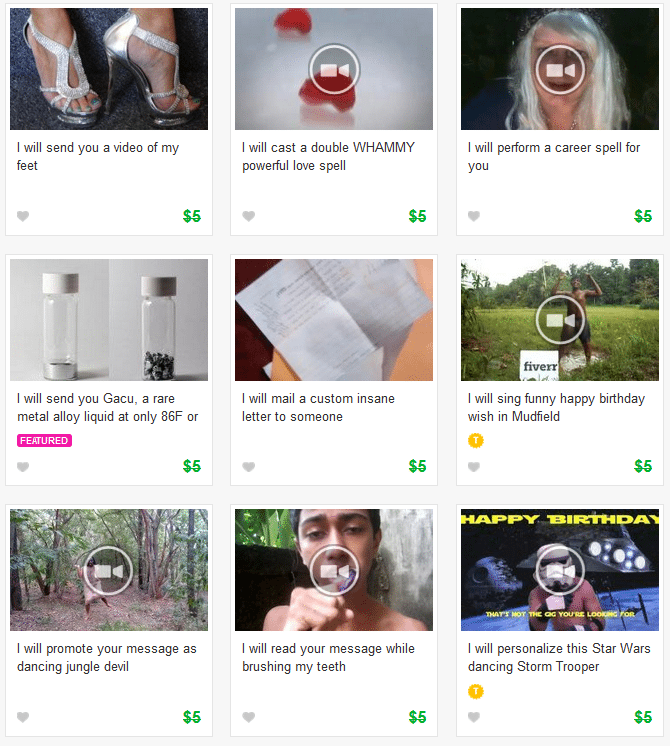
Pet models, human billboards, dares, stunts, or you can go to Fiverr.com and browse for Extremely Bizarre gigs like:
outsourcing using fiverr for extremely bizarre gigs

Basically you can order services for most things needed for a website owner.

But also have a blast out of the other weird gigs if you wish.


Outsourcing using Fiverr is easy.


How is it to sell on Fiverr?


The selling process is the same, almost.


You can easily write the details of what service you offer and post it onto Fiverr spending less than 10 minutes.

Depends on what you offer and how many extras you add of course but the process is simple and fast.

Anyone thinking about joining Fiverr for selling their services can do so by clicking here:

Yes! I want to do outsourcing using Fiverr


It is reported that some sellers get big paydays because of more than one factor:


Popularity of the gig is a thing.


Your skillset is a thing.

Speed of task, like if you are quick you an have a great turnaround time on gigs and process as many as you want to during the day.

Some gigs can be done by quick labor and some can be semi or fully automated by software.


Most gigs require a skillset none the less, but read on till the end to see how you can make money outsourcing using Fiverr without any particular skill.


And also how you market your gigs is a thing.

While Fiverr has it’s site where people come and order, you can always spread the link to you gig elsewhere for more traffic and more work for you.


Outsourcing with Fiverr should be something you check out before you get tired of doing the same time consuming tasks day in and day out IF you have enough for a cup of coffee…
Then you can skip the coffee, hire a worker and take that short break to rest your entrepreneurial head so it is ready for more productive tasks.


While Fiverr is cheap you can make money there you see. But did you know that there are many sites and clients out there wanting services like Fiverr offer?

You can totally use Fiverr and make a business out of outsourcing using Fiverr a task/gig/project a client you have corresponded with need.


This is where you can make EVEN more while not working so hard. All you need to do is to search for people looking to buy gigs like banner design or other.

Contact client and state what you can offer which is relative to his liking. State a price.

Often the price i.e an offline client, consultant service, plumber or other, looking to buy a banner for their website has a different view on what you offer cost.

You can expect to get a high return on your investement. Prices around $200 dollars are not rare for banners.

Which you can get FOR FIVE DOLLARS when outsourcing using Fiverr.


Anyone thinking about joining Fiverr for selling their services can do so by clicking here:

Click here when you want to do outsourcing using Fiverr

Filed Under: Affiliate Marketing, Backlinks, Conversion, Copywriting, Internet Marketing, Internet Marketing Pro, Link Building, List Building, Personal Development, Product Creation, Social Networks, Squeeze Page, Traffic Tagged With: copywriting, fiverr, Internet Marketing, outsourcing, RATINGS, Social Networks, traffic, Video Marketing

Conversion

December 4, 2012 by Rune Ellingsen

How do one get more conversions and what exactly IS “Conversion”?

Conversion can be measured in money.

To be exact you can say it is your most important skill as a marketer to have.

Let’s say you spend $100.00 on an ad. The ad itself generates $100.00.

This means you have an ad that is converting pretty well… Kinda. In fact it is not converting at all but that does not mean you can’t change around on the words in your ad and then get more than the 100 dollars you invested.

Return On Investement known as R.O.I is a term anyone understands. You want a good return for your investement and that is why you should set a goal for getting the highest conversion possible. Ergo making you more cash then if you were to keep your ad unchanged which is ultimately the goal of an ad.

To increase your chances of getting a faster and better return without investing and locking too much of your money you should get a hold of some information which makes you better at creating an ad that sells. Have you ever learned any power words like FREE or IRRESISTIBLE before? Read up on some real books on the subject of copywriting and advertising and use that information as your bible. Do your own research on Amazon for the topic you want if you want a real book. Ebooks are also available though.

Myself I prefer a real book made of paper so I can rest my eyes from the computer screen.

Reccomended books are:

Ca$hvertising

Words That Sell

There are plenty more to choose from but you only need a few set of tools to be ready for a campaign that converts good.

Now in order to get an ad out to the web there are plenty of providers that we can choose from in order to get our ad displayed on all sorts of websites. You want to be as targeted to your audience as possible and find the best bang for your buck where you decide to post your ad. The most targeted traffic for the least amount of investement.

Places where you can post your ad:

BuySellAds.com – A place where you can connect with websites for ad display.

Warriorforum.com – Internet Marketing Forum. Banner Ads on site or in a section of the forum. You can find more there.

If you have an ad that will send traffic to an offer, you want that to be converting as good as possible. That is why you want to have the possibility to read the statistics of your webpage traffic. Using Hostgator as a hosting provider gives you a little insight on the amount of time spent on your site and generic details such as what countries that visit the most and more. You want to have as many details on your traffic as possible.

There are many other ways of tracking traffic though.

Hypertracker is a well known service that allows you to get in-depth with analysis of your traffic.

“My sales were going great, but the problem was I didn’t know where they were coming from. With your powerful service, I was able to see exactly where I needed to continue advertising and saved over $800 a month by dumping the useless ads.” — Tony Garon

Source: Hypertracker.com

Using Quantcast.com also gives you analysis that can be used for your targetting of the prospect website.

For instance if you were to buy an ad on a website which you found from BuySellAds.com then you could do your own research very quickly by typing in the name of the website into Quantcast to see more important stats.

This is good BEFORE buying an ad-space.

Using these simple tools we see what we need in order to match an offer to the targeted prospects from where you choose to front your ad in the first place.

I am going to show you some case studies on this later on.

P.S.

Think you can follow this simple rule:

“Test-Track-Tweak-Profit”

Until next time.

Rune

[Read more…] about Conversion

Filed Under: Conversion, Internet Marketing Tagged With: Banner Ads, conversion, copywriting, FREE, Internet Marketers, Internet Marketing, IRRESISTIBLE, Return Of Investement, Source Hypertracker, targeted traffic, tracking, Using Hostgator, Using Quantcast

  • « Go to Previous Page
  • Page 1
  • Page 2

Primary Sidebar

Footer

Conversions

Without it, there is no business.

With little of it, there is little business.

With high conversions, we thrive.

Learn more about Conversions

Seeds of Success

Experts Aligned.

COMING SOON

Experts Network

Learn more about Seeds of Success

FREE STUFF

Coming soon

Coming soon

Coming soon

Learn more about free stuff.

Made with ☮ & ā¤ļø by Rune - Copyright © 2026 RuneEllingsen.com

  • Home
  • About
  • Resources
  • Contact
  • Terms Of Service
  • Disclaimer
  • Privacy Policy